Color dashboard (ST7735 TFT)
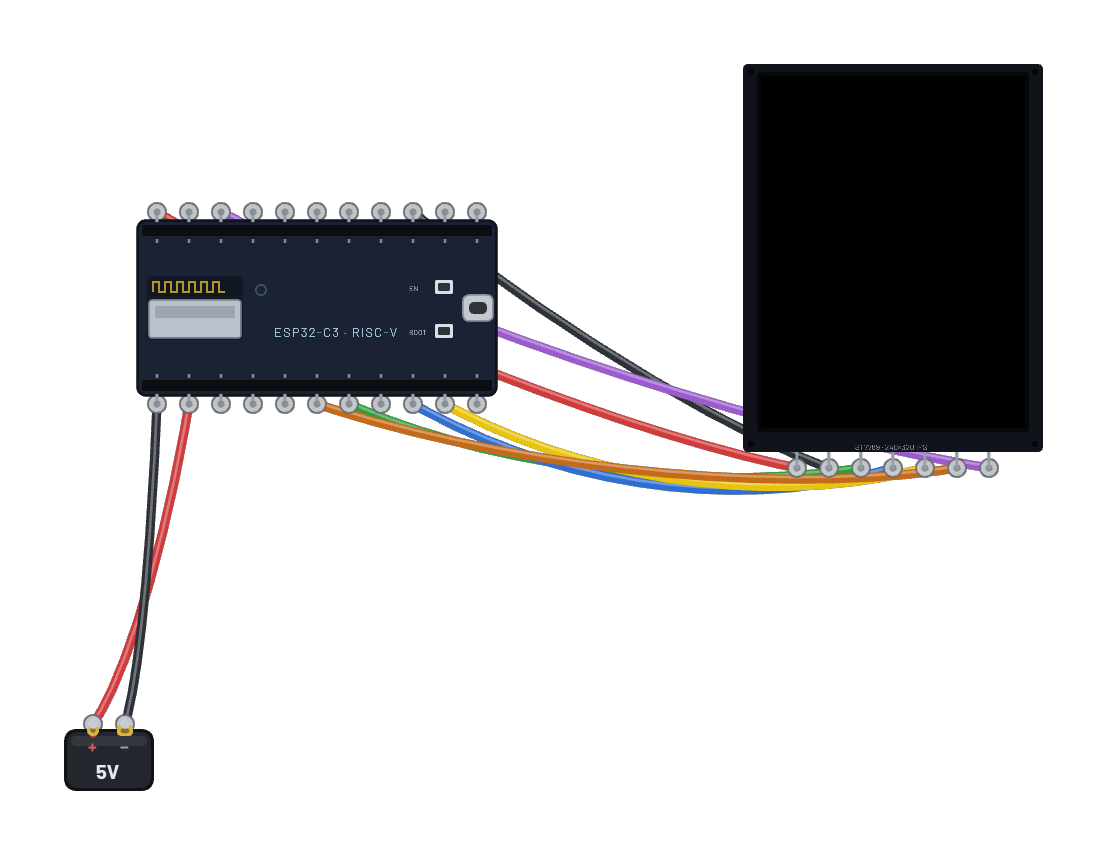
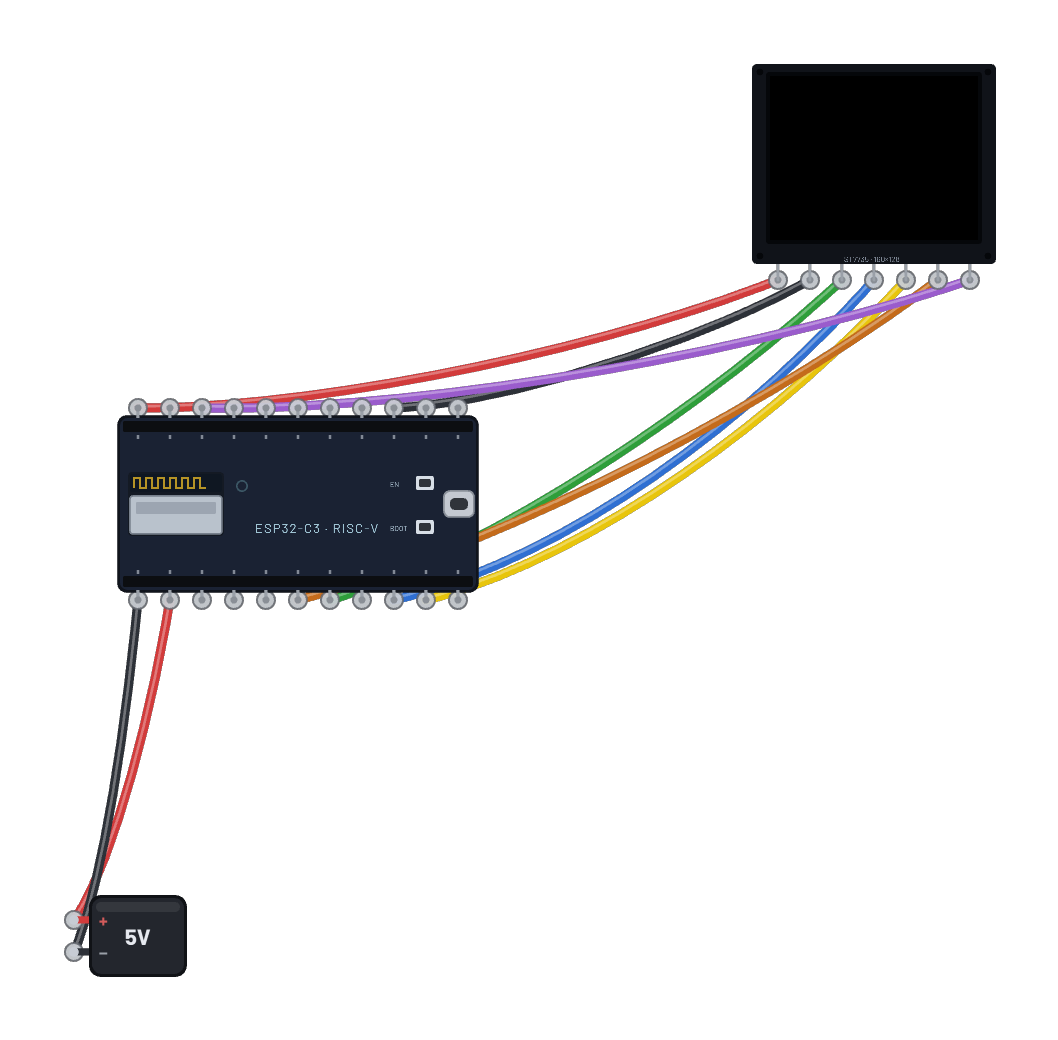
A full-color 1.8″ TFT on the bench: the ESP32-C6 drives a real ST7735 over hardware SPI (`machine.SPI(1)` on the stock pins), sets an address window (CASET/RASET) and streams a 160×128 RGB565 framebuffer per frame at bus speed, exactly like the MicroPython st7735 driver. It fetches live weather from the sandbox internet and paints a colored card: location, temperature, humidity, and conditions. Edit the colors or layout in the Code tab.
How it works
The ESP32-C6 drives a 1.8″ ST7735 color TFT over hardware SPI — stock `machine.SPI(1)` on the chip's fixed pins (SCK=6, MOSI=7), with the emulated GPSPI2 controller handing whole transactions to the panel at bus speed. After the init sequence (software reset, sleep-out, COLMOD 16-bit RGB565, display on), the script builds a 160×128 framebuffer with MicroPython's framebuf in RGB565 format and blits it in one shot: set the column and row address windows with CASET (0x2A) and RASET (0x2B), send RAMWR (0x2C), then stream two bytes per pixel. The controller's address counter wraps across the window exactly as hardware does, so the whole frame lands. Content is a live weather card fetched from the sandbox internet (api.weather.test over a real TCP socket), redrawn every couple of seconds.
What's on the bench
- Battery
- ESP32-C6
- TFT 1.8″ 160×128 (ST7735)
How it's wired
- Battery · pos→ESP32-C6 · vin
- Battery · neg→ESP32-C6 · gnd
- ESP32-C6 · 3v3→TFT 1.8″ 160×128 (ST7735) · vcc
- ESP32-C6 · gnd2→TFT 1.8″ 160×128 (ST7735) · gnd
- ESP32-C6 · g7→TFT 1.8″ 160×128 (ST7735) · din
- ESP32-C6 · g6→TFT 1.8″ 160×128 (ST7735) · clk
- ESP32-C6 · g5→TFT 1.8″ 160×128 (ST7735) · cs
- ESP32-C6 · g3→TFT 1.8″ 160×128 (ST7735) · dc
- ESP32-C6 · g4→TFT 1.8″ 160×128 (ST7735) · rst
The code
This MicroPython script runs on the emulated board every boot; edit it in the Code tab.
from machine import Pin, SPI
import framebuf, time, network, socket, json
W, H = 160, 128
# Hardware SPI (GPSPI2) on the C6 fixed pins: sck=6, mosi=7, miso=2.
spi = SPI(1, baudrate=20000000)
dc = Pin(3, Pin.OUT); cs = Pin(5, Pin.OUT, value=1); rst = Pin(4, Pin.OUT)
def wr(c, d=None):
    cs(0); dc(0); spi.write(bytes([c]))
    if d is not None:
        dc(1); spi.write(bytes(d))
    cs(1)
rst(0); time.sleep_ms(20); rst(1); time.sleep_ms(50)
wr(0x01); time.sleep_ms(120)          # SWRESET
wr(0x11); time.sleep_ms(120)          # SLPOUT
wr(0x3A, [0x05])                       # COLMOD 16-bit RGB565
wr(0x36, [0x00])                       # MADCTL: 160x128 window
wr(0x29)                               # DISPON
buf = bytearray(W * H * 2)
fb = framebuf.FrameBuffer(buf, W, H, framebuf.RGB565)
def rgb(r, g, b):
    # framebuf.RGB565 stores pixels little-endian, but the ST7735 wire is
    # big-endian (MSB first) — byte-swap so colors land right (the classic
    # TFT gotcha every real driver handles).
    v = ((r & 0xF8) << 8) | ((g & 0xFC) << 3) | (b >> 3)
    return ((v & 0xFF) << 8) | (v >> 8)
def show():
    wr(0x2A, [0, 0, 0, W - 1])         # CASET
    wr(0x2B, [0, 0, 0, H - 1])         # RASET
    cs(0); dc(0); spi.write(bytes([0x2C])); dc(1); spi.write(buf); cs(1)
w = network.WLAN(network.STA_IF); w.active(True)
w.connect('BreadboardNet')
while not w.isconnected():
    time.sleep_ms(100)
def weather():
    addr = socket.getaddrinfo('api.weather.test', 80)[0][-1]
    s = socket.socket(); s.connect(addr)
    s.send(b'GET /weather HTTP/1.0\r\nHost: api.weather.test\r\n\r\n')
    r = b''
    while True:
        c = s.recv(256)
        if not c: break
        r += c
    s.close()
    return json.loads(r.split(b'\r\n\r\n', 1)[1])
SKY = rgb(30, 90, 170)
CARD = rgb(20, 28, 40)
n = 0
while True:
    wx = weather(); n += 1
    fb.fill(SKY)
    fb.fill_rect(6, 6, W - 12, H - 12, CARD)
    fb.rect(6, 6, W - 12, H - 12, rgb(90, 130, 200))
    fb.text('INTERNET WEATHER', 14, 14, rgb(140, 200, 255))
    fb.text(wx['location'][:18], 14, 34, 0xFFFF)
    fb.text('%s C' % wx['temperature_c'], 14, 58, rgb(120, 255, 150))
    fb.text('humidity %d%%' % wx['humidity'], 14, 80, rgb(230, 210, 90))
    fb.text(wx['conditions'][:18], 14, 100, rgb(255, 150, 120))
    show()
    print('drew', n, wx['temperature_c'], 'C')
    time.sleep_ms(2000)
Try this
- Watch the colored card update — the temperature and conditions come from a real HTTP fetch each cycle.
- Change the colors: edit the rgb(...) calls or the SKY/CARD fills in the Code tab and re-run.
- Open the 📡 Sniffer to see the weather fetch cross the air, then the SPI-driven redraw follow.
- Swap the data source — point weather() at /time or /api and reformat the card.