Pocket e-reader (e-ink pages)
Three pages of Alice in Wonderland on the 1.54″ e-paper panel, driven over the ESP32-C6’s hardware SPI. Click the button to turn the page; each turn streams 5000 bytes into the SSD1681 RAM and fires a full refresh, flash and all. The current page survives a power cut, exactly like the paperback it is.
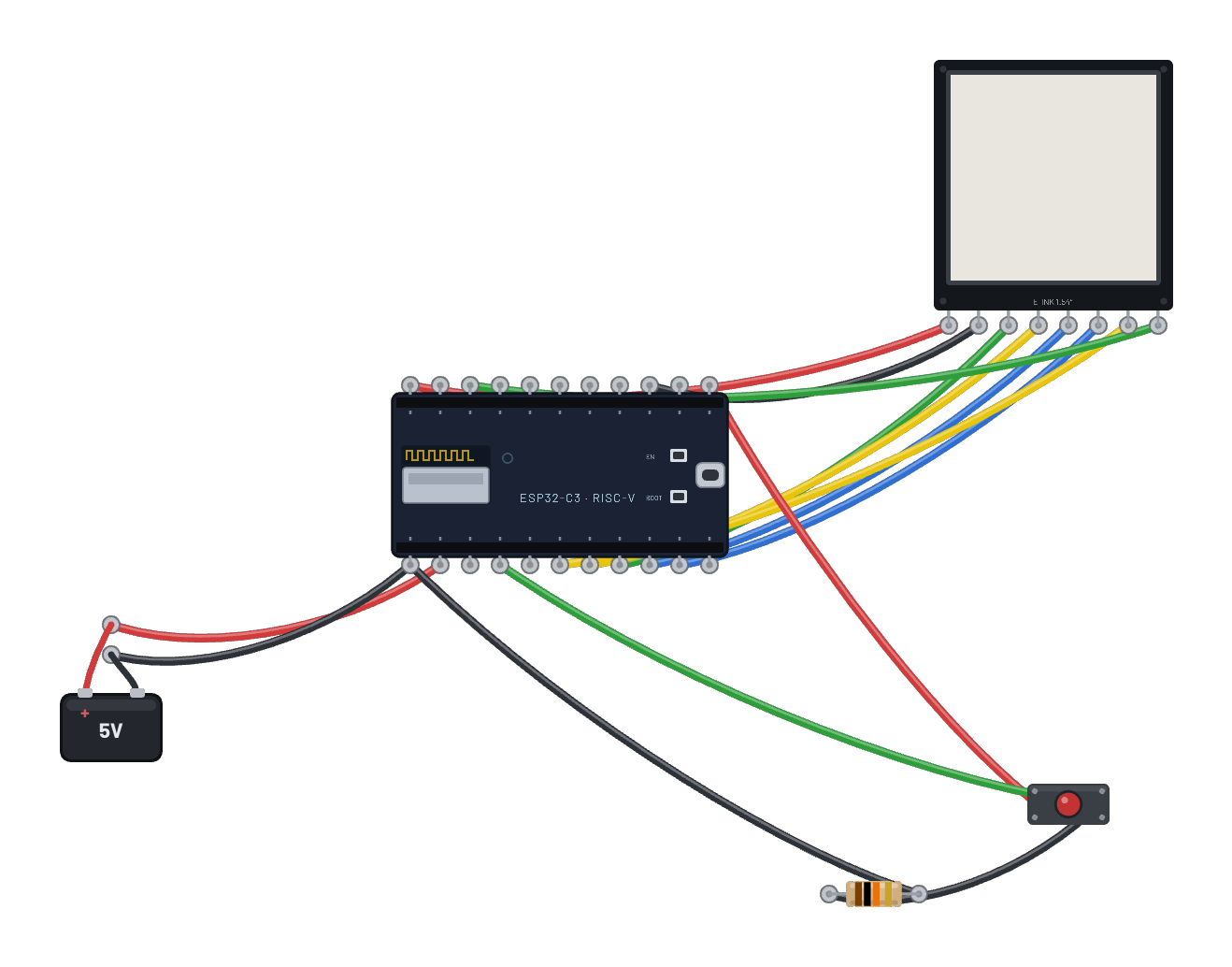
How it works
Three pages of Alice in Wonderland rendered on a 1.54" e-paper panel driven by an ESP32-C6 over hardware SPI (`machine.SPI(1)` on the stock pins). A pushbutton turns the page: each press streams ~5000 bytes into the SSD1681’s RAM and fires a full refresh — the characteristic e-ink flash and all. The panel holds its image with no power, exactly like real e-paper, so the current page survives a Restart.
What's on the bench
- Battery
- Button
- E-Ink 1.54″ 200×200
- ESP32-C6
- Resistor
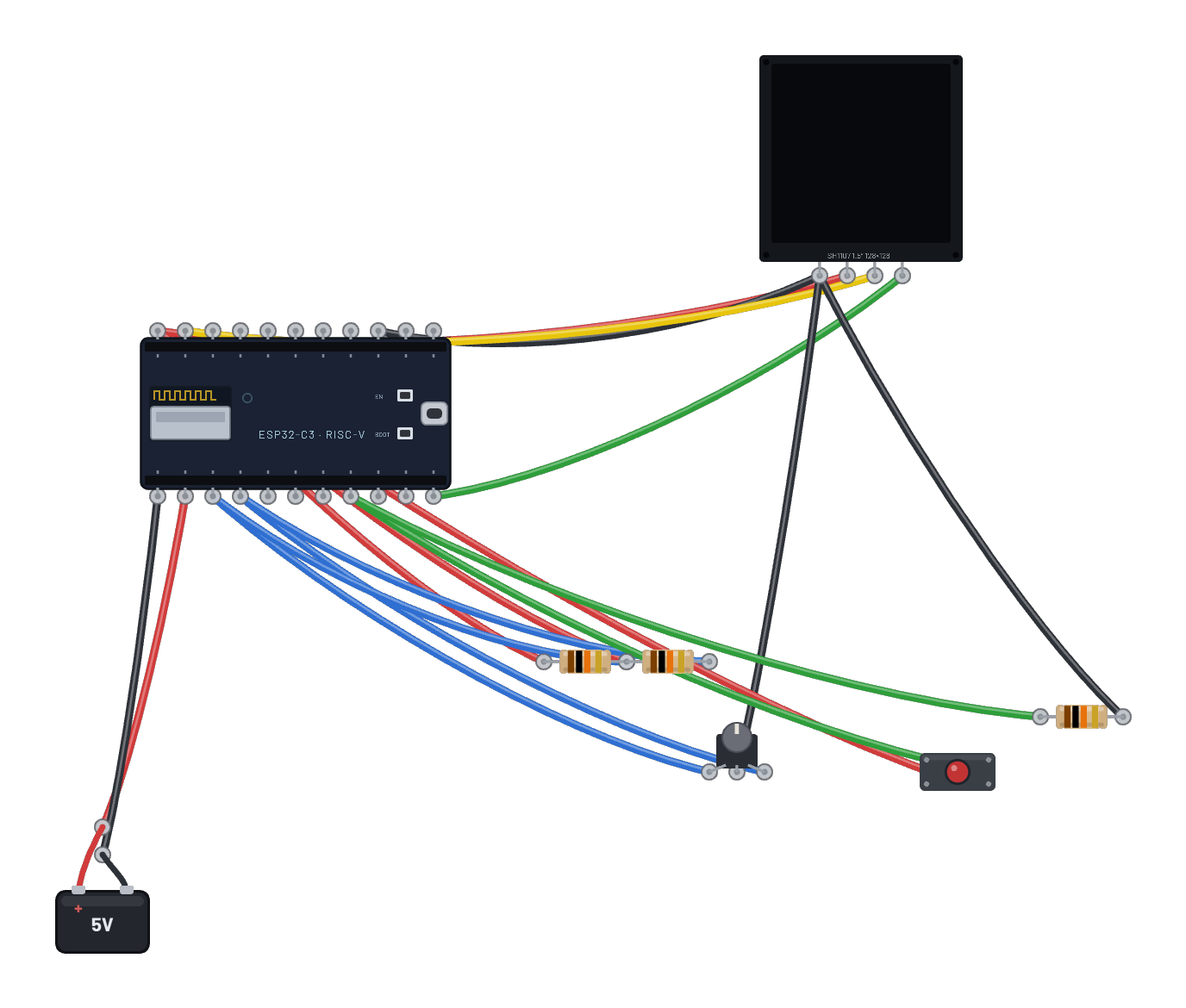
How it's wired
- Battery · pos→ESP32-C6 · vin
- Battery · neg→ESP32-C6 · gnd
- ESP32-C6 · 3v3→E-Ink 1.54″ 200×200 · vcc
- ESP32-C6 · gnd2→E-Ink 1.54″ 200×200 · gnd
- ESP32-C6 · g7→E-Ink 1.54″ 200×200 · din
- ESP32-C6 · g6→E-Ink 1.54″ 200×200 · clk
- ESP32-C6 · g5→E-Ink 1.54″ 200×200 · cs
- ESP32-C6 · g1→E-Ink 1.54″ 200×200 · dc
- ESP32-C6 · g3→E-Ink 1.54″ 200×200 · rst
- ESP32-C6 · g0→E-Ink 1.54″ 200×200 · busy
- ESP32-C6 · 3v3b→Button · a
- Button · b→ESP32-C6 · g8
- Resistor · a→Button · b
- Resistor · b→ESP32-C6 · gnd
The code
This MicroPython script runs on the emulated board every boot; edit it in the Code tab.
from machine import Pin, SPI
import framebuf, time
# Hardware SPI (GPSPI2) on the C6 fixed pins: sck=6, mosi=7.
spi = SPI(1, baudrate=20000000)
cs, dc, rst = Pin(5, Pin.OUT, value=1), Pin(1, Pin.OUT), Pin(3, Pin.OUT, value=1)
busy = Pin(0, Pin.IN)
btn = Pin(8, Pin.IN)
def cmd(c, data=b""):
    cs(0); dc(0); spi.write(bytes([c]))
    if data:
        dc(1); spi.write(data)
    cs(1)
def wait():
    time.sleep_us(50)  # allow the measured 26-40 us BUSY rise
    while busy.value():
        time.sleep_ms(20)
rst(0); time.sleep_ms(10); rst(1); time.sleep_ms(10)
cmd(0x12); wait()
W = H = 200
buf = bytearray(W * H // 8)
fb = framebuf.FrameBuffer(buf, W, H, framebuf.MONO_HLSB)
PAGES = [
    ("ALICE IN WONDERLAND", [
        "Alice was beginning",
        "to get very tired of",
        "sitting by her",
        "sister on the bank,",
        "and of having",
        "nothing to do: once",
        "or twice she had",
        "peeped into the book",
        "her sister was",
        "reading, but it had",
        "no pictures in it,",
    ]),
    ("CHAPTER I (cont.)", [
        "'and what is the use",
        "of a book,' thought",
        "Alice, 'without",
        "pictures or",
        "conversations?'",
        "",
        "So she was",
        "considering in her",
        "own mind...",
    ]),
    ("ABOUT THIS READER", [
        "Each page you see",
        "travelled over SPI:",
        "5000 bytes into the",
        "SSD1681 RAM, then",
        "one Master",
        "Activation refresh.",
        "",
        "E-paper keeps its",
        "page with the power",
        "cut - try it.",
    ]),
]
def show(n):
    title, lines = PAGES[n]
    fb.fill(1)
    fb.fill_rect(0, 0, 200, 18, 0)
    fb.text(title, 8, 6, 1)
    y = 30
    for ln in lines:
        fb.text(ln, 8, y, 0)
        y += 14
    fb.text("page %d/%d - button turns" % (n + 1, len(PAGES)), 4, 188, 0)
    cmd(0x11, b'\x03')
    cmd(0x44, bytes([0, W // 8 - 1]))
    cmd(0x45, b'\x00\x00' + bytes([(H - 1) & 0xFF, (H - 1) >> 8]))
    cmd(0x4E, b'\x00'); cmd(0x4F, b'\x00\x00')
    cmd(0x24, buf); cmd(0x22, b'\xF7'); cmd(0x20); wait()
    print("page", n + 1, "shown")
page = 0
show(page)
while True:
    if btn.value():
        page = (page + 1) % len(PAGES)
        show(page)
        while btn.value():
            time.sleep_ms(20)
    time.sleep_ms(30)
Try this
- Press the button to turn the page — watch the full e-ink refresh flash.
- Press Restart and see the last page persist (e-ink holds its image with no power).
- Open the Code tab to read the SSD1681 hardware-SPI driver and the page-turn refresh.
- Follow each page-turn and byte stream in the serial tab.