74HC595 binary counter
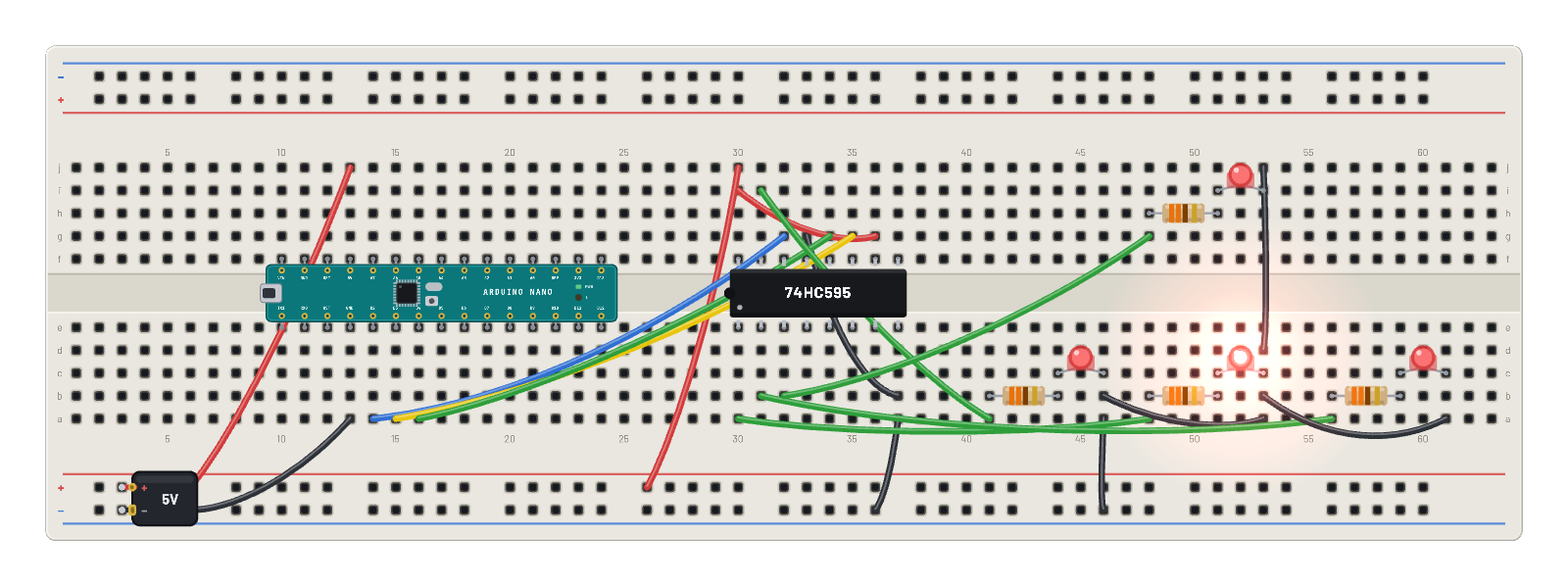
The Arduino Nano bit-bangs a shift register; four LEDs show the low bits counting up ~10×/second. The Code tab holds the same counter as an editable Arduino sketch.
How it works
How three wires drive eight outputs. The Nano bit-bangs a 74HC595: shiftOut clocks each bit of a counter into DS on SHCP's rising edges, then a pulse on STCP latches all eight bits to the output pins at once, glitch-free. The counter increments ten times a second, and Q0–Q3 drive four LEDs that count upward in binary. MR̅ is tied high and OE̅ low, the two housekeeping pins every 595 circuit must get right.
What's on the bench
- 4× LED
- 4× Resistor
- 74HC595
- Arduino Nano
- Battery
How it's wired
- hole a13→hole B-5
- hole j13→hole B+5
- hole a37→hole B-30
- hole j30→hole B+21
- hole g36→hole i30
- hole g33→hole b37
- hole a14→hole g32
- hole a15→hole g35
- hole a16→hole g34
- hole i31→hole a41
- hole a46→hole B-38
- hole a30→hole a48
- hole a53→hole b46
- hole b31→hole a56
- hole a61→hole b53
- hole b32→hole g48
…and 1 more connections — open it in the simulator to see every wire.
The code
This Arduino C++ sketch lives in the Code tab; sign in and press Compile & upload to build real firmware for the emulated board.
// The same 74HC595 counter as an Arduino sketch. Edit it, then Compile &
// upload (sign-in needed): the server builds real AVR firmware and flashes it.
const int DS = 2;    // serial data
const int SHCP = 3;  // shift clock
const int STCP = 4;  // latch clock

byte count = 0;

void setup() {
  pinMode(DS, OUTPUT);
  pinMode(SHCP, OUTPUT);
  pinMode(STCP, OUTPUT);
}

void loop() {
  digitalWrite(STCP, LOW);
  shiftOut(DS, SHCP, MSBFIRST, count);  // Q0 = bit 0 ... Q7 = bit 7
  digitalWrite(STCP, HIGH);
  count++;
  delay(100);  // ~10 counts per second
}
Try this
- Read the LEDs as a binary number and watch it count 0, 1, 2, 3… ten times a second.
- Probe DS and SHCP together on the ∿ Scope and catch the eight clock pulses per update.
- Slow delay(100) to delay(500) in the sketch and Compile & upload for a readable count.
- Change shiftOut to send count << 4 and watch the visible nibble freeze — the action moved to Q4–Q7.