Example project · Builds & projects
microSD write & read-back
A real 64 MB SD card in SPI mode: the Uno runs the honest init handshake (CMD0, CMD8, ACMD41), writes a message into a raw block through the hardware SPI port, reads it back with CMD17 and prints it on the serial monitor — watch the activity LED blink on the breakout. The card ships FAT16-formatted, so the Code tab’s SdFat sketch (compile & upload) can write real files to it too.
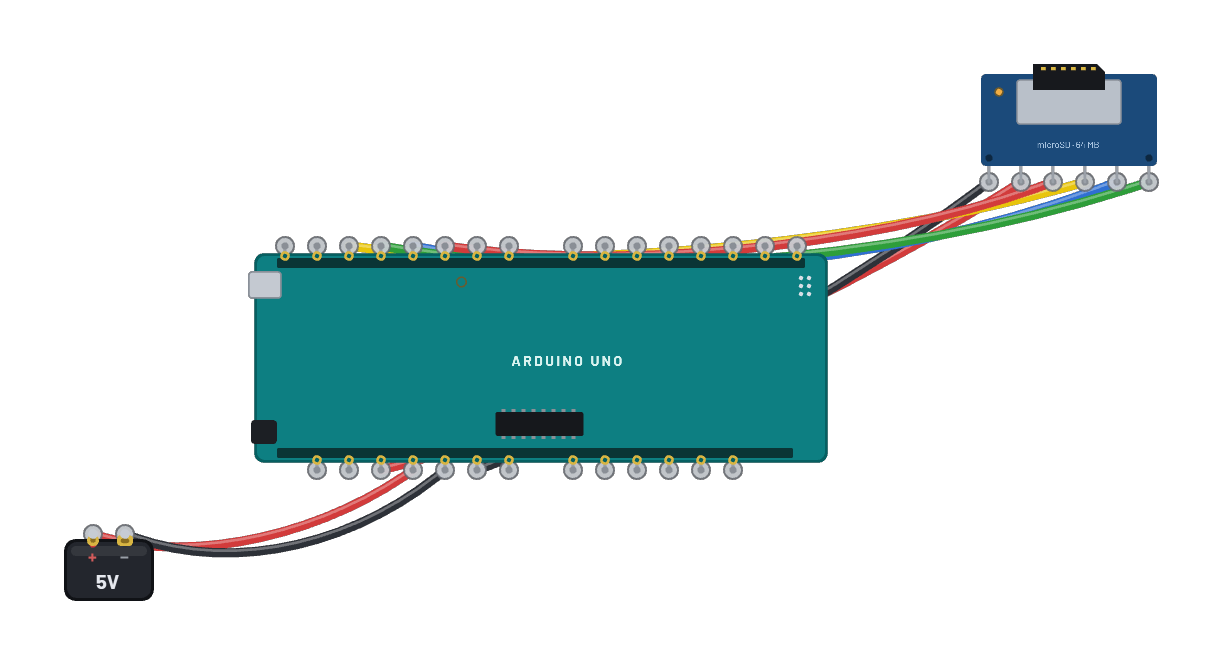
What's on the bench
- Arduino Uno R3
- Battery
- microSD card
How it's wired
- Battery · pos→Arduino Uno R3 · 5v
- Battery · neg→Arduino Uno R3 · gnd
- Arduino Uno R3 · 3v3→microSD card · vcc
- Arduino Uno R3 · gnd2→microSD card · gnd
- Arduino Uno R3 · d13→microSD card · sck
- Arduino Uno R3 · d11→microSD card · mosi
- Arduino Uno R3 · d12→microSD card · miso
- Arduino Uno R3 · d10→microSD card · cs
The code
This Arduino C++ sketch lives in the Code tab; sign in and press Compile & upload to build real firmware for the emulated board.
// The same card through the MIT-licensed SdFat library (the card comes
// FAT16-formatted, so sd.begin just works). CS on pin 10; SdFat drives
// the hardware SPI port (11/12/13) itself.
#include <SdFat.h>

SdFat sd;

void setup() {
  Serial.begin(9600);
  if (!sd.begin(10)) {
    Serial.println("card init failed");
    return;
  }
  Serial.println("SD init OK");
  File f = sd.open("log.txt", FILE_WRITE);
  f.println("HELLO FROM SD :)");
  f.close();
  f = sd.open("log.txt");
  Serial.print("log.txt: ");
  while (f.available()) Serial.write(f.read());
  f.close();
}

void loop() {}