Example project · Sensors
Laser tripwire alarm
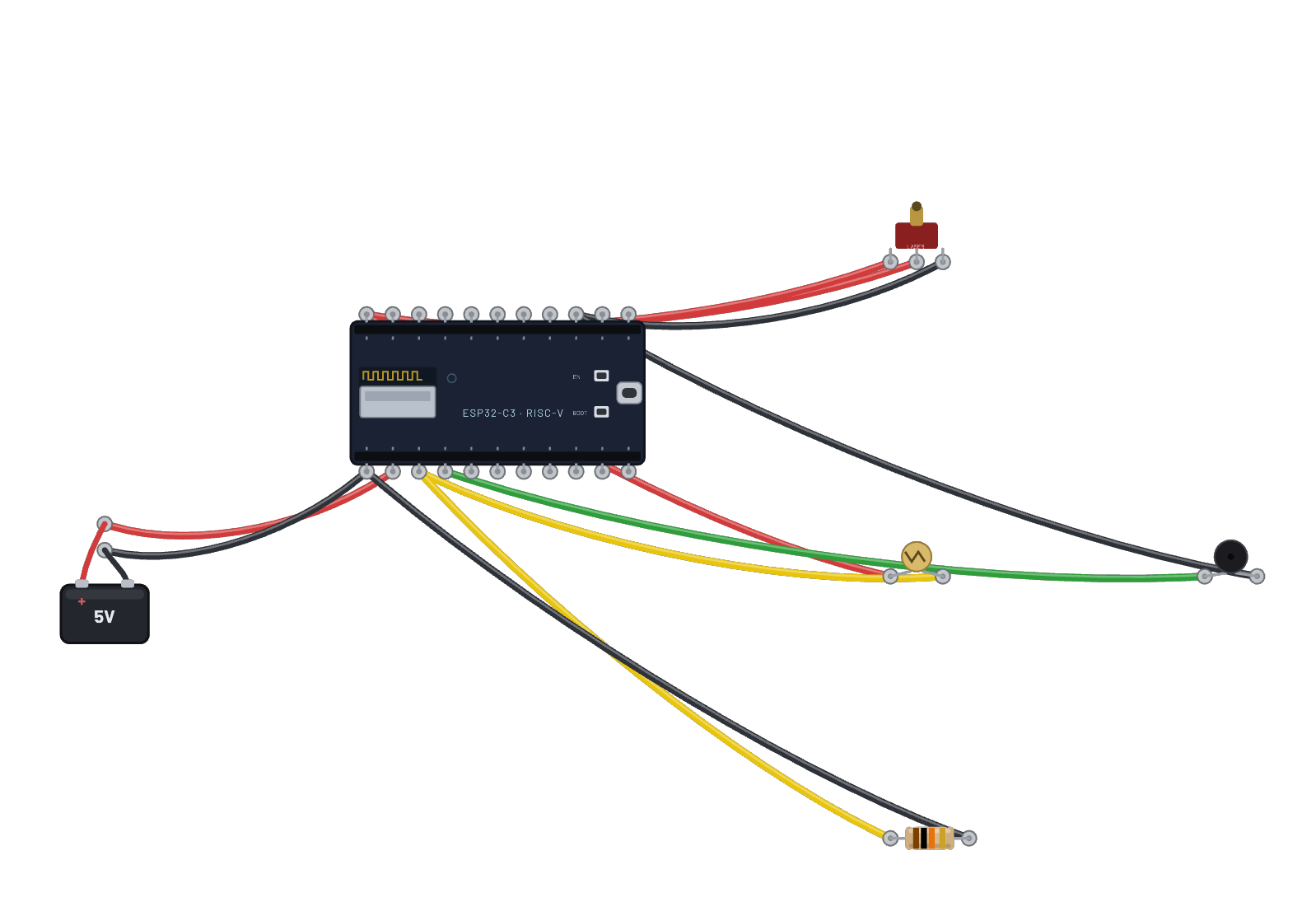
A laser aimed at a photoresistor; the ESP32 reads the light on its ADC and sounds the buzzer when the beam is broken. Drop the photoresistor’s Light-level slider to break the beam.
How it works
A beam and a light sensor make an alarm. The KY-008 laser is tied on, shining across the bench at a photoresistor whose resistance swings from ~1 kΩ in the beam to ~1 MΩ in the dark. With a 10 kΩ resistor it forms a divider the C3's ADC reads on G0: beam intact reads high, beam broken collapses. The script compares against a 0.3 threshold; below it, G1 drives the active buzzer (an active buzzer makes its own fixed ~2.4 kHz tone from DC) and prints ALARM.
What's on the bench
- Battery
- Buzzer
- ESP32-C3
- Laser (KY-008)
- Photoresistor
- Resistor
How it's wired
- Battery · pos→ESP32-C3 · vin
- Battery · neg→ESP32-C3 · gnd
- ESP32-C3 · 3v3→Laser (KY-008) · vcc
- ESP32-C3 · 3v3→Laser (KY-008) · s
- ESP32-C3 · gnd2→Laser (KY-008) · gnd
- ESP32-C3 · 3v3→Photoresistor · a
- Photoresistor · b→ESP32-C3 · g0
- ESP32-C3 · g0→Resistor · a
- Resistor · b→ESP32-C3 · gnd
- ESP32-C3 · g1→Buzzer · pos
- Buzzer · neg→ESP32-C3 · gnd2
The code
This MicroPython script runs on the emulated board every boot; edit it in the Code tab.
from machine import Pin, ADC
import time
adc = ADC(Pin(0))
adc.atten(ADC.ATTN_11DB)
buzz = Pin(1, Pin.OUT, value=0)
# Bright beam on the photoresistor => high reading. Break it => alarm.
while True:
    light = adc.read_u16() / 65535
    broken = light < 0.3
    buzz(1 if broken else 0)
    print('ALARM' if broken else 'armed', round(light, 2))
    time.sleep_ms(300)
Try this
- Drag the photoresistor's Light level slider low: the beam 'breaks' and the alarm sounds.
- Click 🔊 in the header first so you can actually hear the buzzer.
- Hover the divider node on G0 and watch the voltage collapse as the light dies.
- Tighten the 0.3 threshold in the script to make the tripwire more paranoid.