Keypad door lock (keypad + OLED)
Click 1 2 3 4 on the keypad, then # to unlock (the OLED prompts you and * clears a mistake). Behind the scenes it is a real embedded project: an ESP32 scans a 4x4 matrix keypad, edge-detects new presses, and drives an OLED lock screen showing UNLOCKED or DENIED — all in MicroPython.
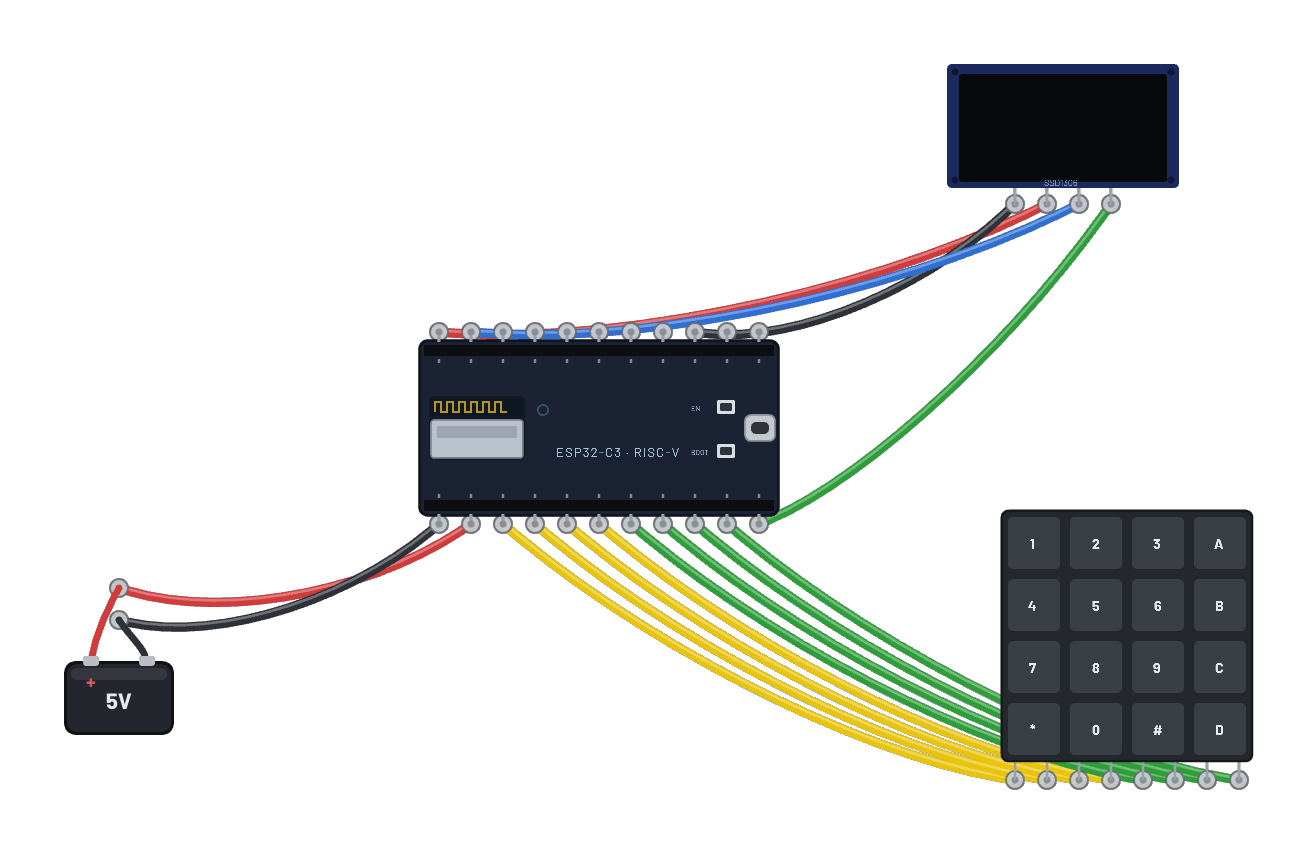
How it works
A matrix keypad scanned the way every keypad ever is: four row pins (G0–G3) driven high one at a time, four column pins (G4–G7) read back, so 8 pins cover 16 keys. The script scans continuously, edge-detects fresh presses (canvas keys latch until clicked again, so it must), and builds an entry string: digits append, * clears, # submits. The right PIN (1234) prints UNLOCKED and swaps the OLED lock screen; anything else earns a DENIED.
What's on the bench
- Battery
- ESP32-C3
- Keypad 4×4
- OLED 128×64
How it's wired
- Battery · pos→ESP32-C3 · vin
- Battery · neg→ESP32-C3 · gnd
- ESP32-C3 · g0→Keypad 4×4 · r0
- ESP32-C3 · g1→Keypad 4×4 · r1
- ESP32-C3 · g2→Keypad 4×4 · r2
- ESP32-C3 · g3→Keypad 4×4 · r3
- ESP32-C3 · g4→Keypad 4×4 · c0
- ESP32-C3 · g5→Keypad 4×4 · c1
- ESP32-C3 · g6→Keypad 4×4 · c2
- ESP32-C3 · g7→Keypad 4×4 · c3
- ESP32-C3 · 3v3→OLED 128×64 · vcc
- ESP32-C3 · gnd2→OLED 128×64 · gnd
- ESP32-C3 · g9→OLED 128×64 · scl
- ESP32-C3 · g8→OLED 128×64 · sda
The code
This MicroPython script runs on the emulated board every boot; edit it in the Code tab.
from machine import I2C, Pin
import framebuf, time
i = I2C(0, scl=Pin(9), sda=Pin(8))
buf = bytearray(1024)
fb = framebuf.FrameBuffer(buf, 128, 64, framebuf.MONO_VLSB)
for c in b'\xae\xd5\x80\xa8\x3f\xd3\x00\x40\x8d\x14\x20\x00\xa1\xc8\xda\x12\x81\xcf\xd9\xf1\xdb\x40\xa4\xa6\xaf':
    i.writeto(0x3c, bytes([0, c]))
def show():
    i.writeto(0x3c, b'\x00\x21\x00\x7f\x22\x00\x07')
    i.writeto(0x3c, b'\x40' + buf)

# TRY IT: click 1 2 3 4 on the keypad, then # to unlock (* clears).
# 4x4 matrix keypad: rows drive, columns read (active-high scan).
rows = [Pin(n, Pin.OUT) for n in (0, 1, 2, 3)]
cols = [Pin(n, Pin.IN) for n in (4, 5, 6, 7)]
KEYS = ['123A', '456B', '789C', '*0#D']
def scan():
    pressed = set()
    for r in range(4):
        for x in range(4):
            rows[x].value(1 if x == r else 0)
        time.sleep_ms(2)  # let the row drive settle before reading
        for c in range(4):
            if cols[c].value():
                pressed.add(KEYS[r][c])
    return pressed

PIN = '1234'
entry = ''
msg = 'TRY 1234 THEN #'
prev = set()
def render():
    fb.fill(0)
    fb.text('SECURE LOCK', 20, 2)
    fb.text('CODE: ' + '*' * len(entry), 8, 24)
    fb.text(msg, 8, 46)
    show()
render()
print('lock ready -- click 1 2 3 4 on the keypad, then # to unlock (* clears)')
while True:
    cur = scan()
    for k in cur - prev:  # keys newly pressed since the last scan
        if k == '#':
            msg = 'UNLOCKED' if entry == PIN else 'DENIED'
            print('submit', entry, '->', msg)
            if msg == 'DENIED':
                print('hint: the code is 1234, then # to submit')
            entry = ''
        elif k == '*':
            entry, msg = '', 'CLEARED'
        elif k in '0123456789':
            entry = (entry + k)[:8]
            msg = 'THEN # TO SUBMIT' if entry else 'TRY 1234 THEN #'
    prev = cur
    render()
    time.sleep_ms(40)
Try this
- Click 1 2 3 4 then # on the keypad: UNLOCKED, on the OLED and in serial.
- Type something wrong and submit with # for the DENIED screen; * clears a fumbled entry.
- Change PIN in the script to your own code and re-run.
- Remember the keys latch: click a stuck key again to release it before the next entry.